
This page covers Maretron-specific identification and configuration. For general activity settings (toggles, sensor types, thresholds), see Add NMEA 2000 device.
Connect and configure a Maretron MPower CLMD12 or CLMD16 DC Load Module with your BRNKL system.
Prerequisites
The Maretron MPower module must be pre-configured on the vessel using Maretron's N2KAnalyzer before connecting to BRNKL. This is normally performed by the boat manufacturer or a trained marine electrician.
Connect to NMEA 2000 network
Connect the Maretron module to the same NMEA 2000 network as the BRNKL system.
Identify the module in BRNKL
Maretron modules appear in the NMEA 2000 device list alongside button panels — you need to identify the correct path before configuring it.
-
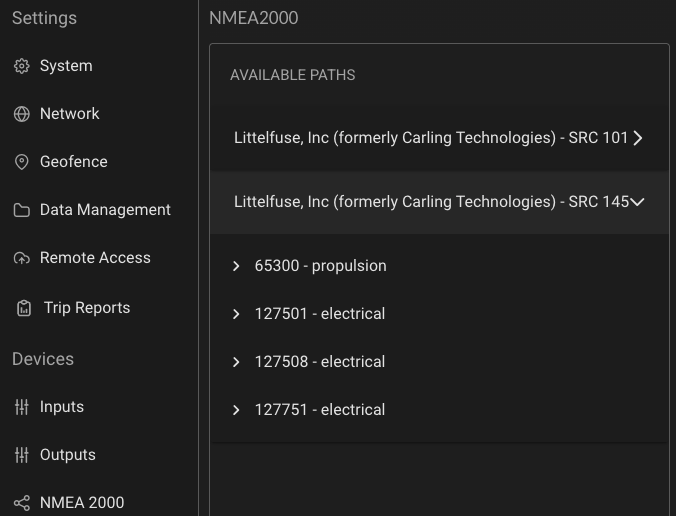
In BRNKL Device Manager, go to Settings > NMEA 2000. You may see multiple paths labelled Littlefuse, Inc. or Maretron — one for each bank of buttons and one for each bank of digital switches.
The Maretron module sends updates every 15 seconds. Digital switches may take up to 15 seconds to appear.
-
Expand each path and check the PGNs listed:
-
PGN 127501 only — button panel, cannot be controlled. Skip these.
-
PGN 127501 + PGN 127751 — digital switching module. This is the one to configure.
-
Name and configure switches
-
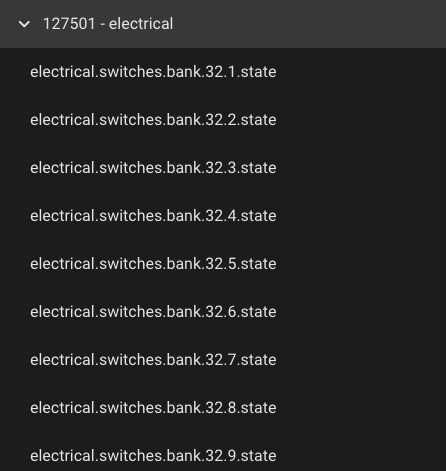
Expand PGN 127501 under the correct module path. Endpoints appear in the format
electrical.switches.bank.xx.yy.state, where xx is the NMEA 2000 Device Instance and yy is the Maretron switch number.
-
Rename each switch to something meaningful (e.g., Bilge Pump, Flood Light).
-
Configure each switch using the standard NMEA 2000 activity settings — see Add NMEA 2000 device for the full reference.
Maretron-specific: Control toggle
Maretron digital switching endpoints add one extra toggle not available on read-only NMEA 2000 devices:
-
Control — when enabled, BRNKL can switch the output on or off from Device Manager or the mobile app. Only available on endpoints that expose PGN 127751 (digital switching modules, not button panels).
Test functionality
-
Monitor test — press the physical switch on the vessel and confirm the status updates in BRNKL Device Manager or the mobile app.
-
Control test — in Device Manager, go to Controls and toggle the switch on and off to confirm remote control is working.