
This page covers the device-specific installation and wiring for a BRNKL Shore Power Sensor. For general input setup and activity settings, see Add input device.
The BRNKL Shore Power Sensor detects whether AC shore power is connected. Useful for confirming charger operation, catching unexpected disconnects, and triggering alerts when shore power is lost.
Disconnect all AC power sources before accessing electrical panels, switches, or devices.
Install the sensor
Mount the sensor in a stable location indoors, close to the AC electrical panel, with access to the non-inverted side of the panel. Secure with two screws.
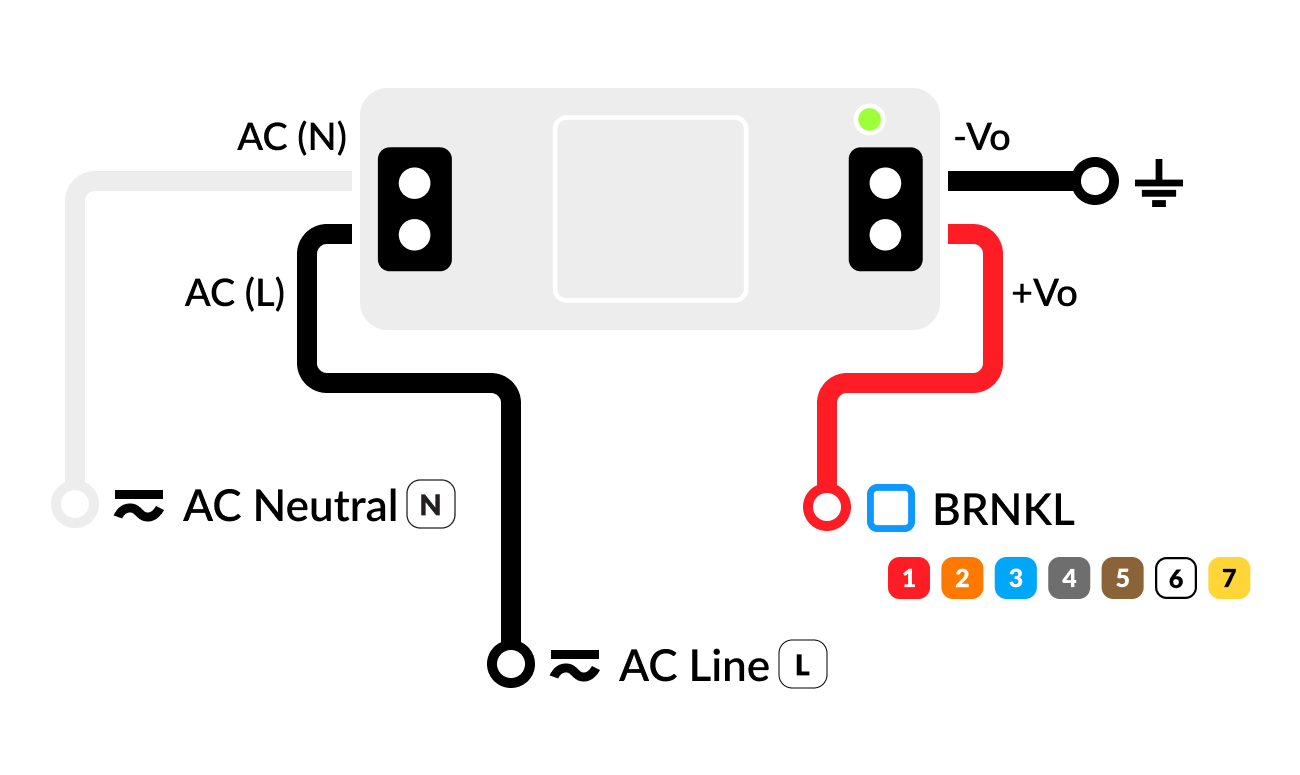
Wiring
-
AC (N) terminal

-
AC (L) terminal

-
-Vo terminal

-
+Vo terminal


Configure
In BRNKL Device Manager, go to Settings > Inputs, select the input channel the sensor is wired to, and set Input Type to Shore Power. The High and Low labels will pre-set to Connected and Disconnected.
Recommended settings
-
Alert When — set to Low to alert on disconnects only, or Both to alert on every state change.
-
Consider enabling Critical Alert so disconnect notifications are sent even when BRNKL is disarmed — losing shore power while away from the boat is usually worth knowing about immediately.
The shore power sensor output has minimal load, so voltage drops slowly after shore power is disconnected. Expect a short delay before the disconnected alert triggers. This is normal and has no impact during regular operation.