
This page covers the device-specific wiring for the BRNKL RF Key Fob Receiver. For general input setup and activity settings, see Add input device.
This guide does not apply to Fibaro wireless key fobs. For Fibaro key fob pairing, see Add key fob.
The BRNKL RF Key Fob Receiver is a wired accessory that allows a key fob to remotely trigger BRNKL input channels. Each button on the key fob corresponds to a separate wire on the receiver, which must be wired to a separate BRNKL input channel.
Prerequisites
-
BRNKL Key Fob Receiver
-
BRNKL RF Key Fob
-
12–24 V DC power and common ground
-
Two available BRNKL Blue input channels
-
Marine-grade wiring tools and connectors
Wiring
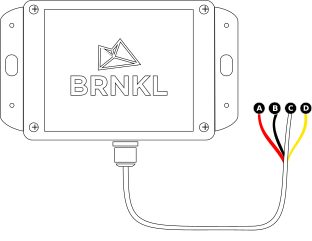
|
Receiver wire |
Function |
Connects to |
|---|---|---|
|
Red |
DC power (12–24 V) |
Fused unswitched DC power source |
|
Black |
Ground |
Common ground |
|
White |
Key fob button A |
BRNKL Blue input channel |
|
Yellow |
Key fob button B |
BRNKL Blue input channel |
Install the receiver
Do not mount the receiver inside metal enclosures — this may significantly reduce key fob range.
-
Mount the receiver in a dry, secure location near the BRNKL Blue to minimise wire runs.
-
Connect the red wire to a fused 12–24 V DC power source, and the black wire to ground (the same ground reference as the BRNKL Blue).
-
Select two available input channels on the BRNKL Blue and connect:
-
White wire → input channel for key fob button A
-
Yellow wire → input channel for key fob button B
-
Each wire triggers its assigned input channel when the corresponding key fob button is pressed.
Configure
In BRNKL Device Manager, go to Settings > Inputs and configure each of the two channels:
-
Assign a descriptive name (e.g., Keyfob A, Keyfob B).
-
Set the Input Type to Arm/Disarm (toggle), Arm, or Disarm, depending on the desired function of each button.
-
Test each button to verify the expected outcome.
Notes
-
Each key fob button must be wired to a separate BRNKL input channel. Do not connect both button wires to the same input.
-
Secure all wiring and provide strain relief. Use marine-grade wiring and connectors.