
This page covers the device-specific steps for the First Alert SCO5CN Smoke and Carbon Monoxide Alarm. For general pairing flow, prerequisites, and activity settings, see Add wireless device. For full product details, see the First Alert manufacturer's page.
The wireless smoke and CO alarm detects smoke and dangerous carbon monoxide levels. Installed in cabins, galleys, or engine rooms, it sounds a local alarm and sends an alert through BRNKL so you can respond immediately, whether onboard or away.
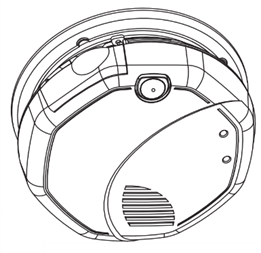
Pair smoke/CO alarm
The alarm may emit a loud beep during the pairing process.
-
Slide open the battery drawer on the back of the alarm.
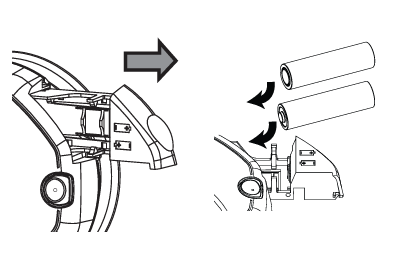
-
In BRNKL Device Manager, go to Settings > Wireless and click + Add Device.
-
Press and hold the Test button on the front of the alarm. While holding:
-
If a plastic battery tab is present, remove it while continuing to hold.
-
If inserting batteries, close the drawer fully while holding the button.
-
-
Release the button once the drawer is closed.
-
When prompted, enter the 5-digit PIN located on the back of the alarm or inside the battery compartment, then enter a descriptive name.
Remove smoke/CO alarm
-
Slide the battery drawer open.
-
Press and hold the Test button while closing the drawer, then release once closed.
-
In BRNKL Device Manager, go to Settings > Wireless, select the device, and click – Remove.
Factory reset
-
With the alarm powered on, press and hold the Test button for 10 or more seconds.
-
The alarm will reset and return to standby mode.